
Artificial Intelligence is changing the way people create videos. Today, you don’t need an expensive camera, advanced editing skills, or professional software to make stunning videos. With AI-powered tools like Runway ML, anyone can create high-quality videos simply by writing a prompt and using their imagination.
This guide explains how Runway ML works, how to create AI-generated videos, and how to use its free credits effectively.
What is Runway ML?
Runway ML is a powerful AI video generation and editing platform that allows users to create videos from text prompts and images. It is one of the most popular AI video tools available today because of its ease of use and advanced AI capabilities.
Key Features
- Text-to-Video Generation
- Image-to-Video Conversion
- AI Video Editing
- Background Removal
- Video Upscaling
- Voice and Lip Sync Features
- Character and Style Consistency Tools
- Multiple AI Models for Content Creation
How to Get Started with Runway ML
Step 1: Visit the Official Website
Go to the official Runway ML website and click Get Started.
Step 2: Create an Account
Sign up using your email address and verify your account.
Step 3: Access Free Credits
New users typically receive free credits that can be used to test the platform and generate videos without paying immediately.
Creating AI Images
Before generating videos, you can create AI images directly inside Runway ML.
How It Works
- Open the image generation section.
- Enter a text prompt describing your image.
- Select the desired aspect ratio.
- Click Generate.
Example Prompt:
“A futuristic AI city with flying cars, neon lights, and advanced robots.”
The AI will generate images based on your description within seconds.
Turning Images into Videos
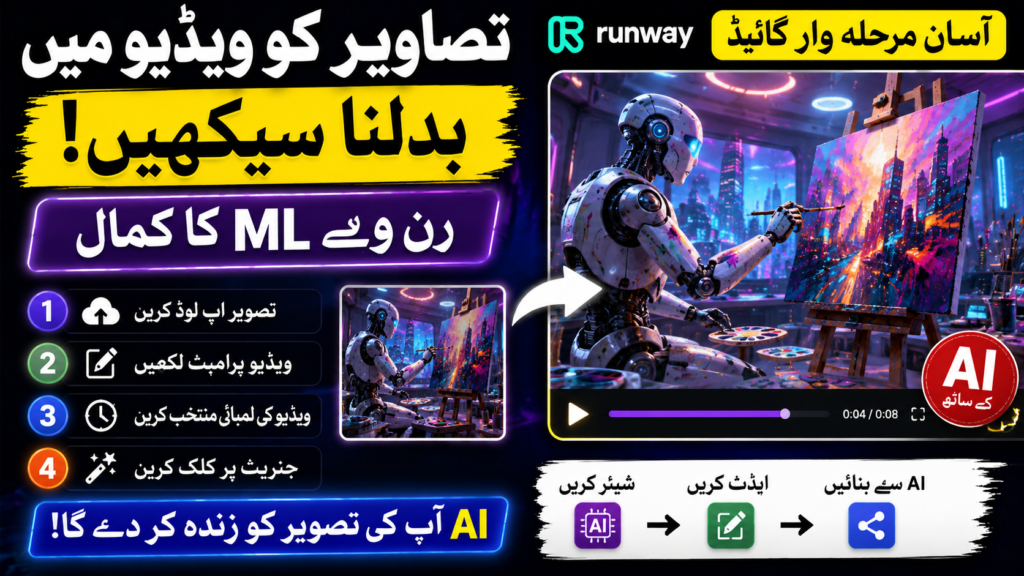
One of Runway ML’s most exciting features is Image-to-Video generation.
Steps
- Upload an image.
- Enter a video prompt.
- Select video length.
- Click Generate.
The AI will animate the image and transform it into a short video.
Example Prompt:
“A robot artist painting on a canvas inside a futuristic studio while colorful lights move around.”
Understanding Prompt Writing
The quality of your video depends heavily on your prompt.
Good Prompt Structure
Include:
- Subject
- Action
- Environment
- Camera Movement
- Visual Style
Example
“A cinematic drone shot of a futuristic city at sunset, flying cars moving through neon-lit streets, ultra-realistic, high detail.”
Using ChatGPT for Better Prompts
If you’re not good at writing prompts, you can use ChatGPT to generate professional prompts.
Example Request:
“Create a detailed Runway ML prompt for a futuristic robot learning to paint.”
ChatGPT can generate optimized prompts that produce better AI videos.
Free Credits and Video Limits
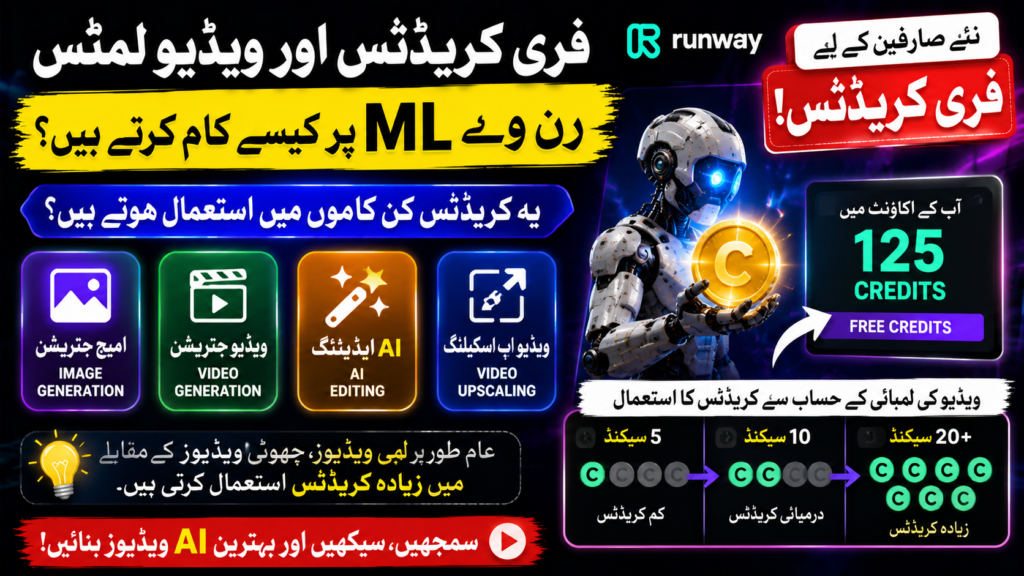
Runway ML provides free credits to new users.
These credits can be used for:
- Image Generation
- Video Generation
- AI Editing
- Video Upscaling
Longer videos generally consume more credits than shorter ones.
Advanced AI Editing Tools
Runway ML also offers powerful editing features.
Background Removal
Remove unwanted backgrounds automatically.
Object Removal
Delete objects from videos with AI.
Video Upscaling
Increase video quality up to higher resolutions.
Style Transfer
Change the appearance and artistic style of videos.
Why Runway ML is Popular

Many content creators prefer Runway ML because:
- No camera is required
- No editing experience is needed
- Fast video creation
- Professional-quality results
- Easy-to-use interface
- AI-powered automation